
Unleash the Full Potential of vMix with SKAARHOJ controllers
Live production thrives on the perfect combination of software power and tactile precision. That’s why SKAARHOJ offers integration solutions designed for vMix, the industry leader in live production and streaming software. With SKAARHOJ, you can enhance your vMix experience through reliable hardware control tailored to meet the demands of modern live production workflows.
About vMix
vMix is a versatile and powerful live production software that enables professional-grade streaming, video mixing, and recording. Trusted by content creators, churches, broadcasters, and event producers worldwide, vMix provides support for multiple input types, real-time effects, and streaming to multiple platforms simultaneously.
Its features include built-in live titling, instant replay, and multi-camera support, making it a cornerstone in live production setups.


Vision Mixing with vMix
Control your vMix production with the precision and versatility of SKAARHOJ hardware. Whether you’re cutting between camera angles, managing overlays, or executing advanced transitions, our universal controllers integrate seamlessly with vMix.
Tactile Switching: Use SKAARHOJ controllers like the Air Fly, Master Key One or Air Fly Pro to assign program and preview selections or to control transition effects with precision.
Dynamic Flexibility: Customize every button and encoder through our Reactor Web UI for your specific vMix workflows.
Multi-Device Integration: Switch effortlessly between vMix and other SKAARHOJ-supported devices using a single panel.
Control all the relevant parameters of vMix such as stop/start streaming and recording, change transition types, select and apply overlays, trigger vMix shortcuts and more
Dynamic button labelling from vMix
For the full list of available vMix parameters visit:
vMix Replay
Take full control of vMix Replay, one of the most powerful replay systems in live production, with SKAARHOJ’s Time Spin controller. Whether you’re managing multi-angle instant replays, creating slow-motion highlights, or navigating through footage, Time Spin provides the tactile precision and flexibility needed for flawless live production workflows.
Full list of available parameters available here:


Parameter Sneak Peek
Multi-Angle Replay Management: Control up to 8 camera angles in vMix Replay and switch easily.
Clip & Timeline Modes: Two workflows for quick clips or detailed replay control.
Clip Mode: Create, label, and recall replay clips instantly.
Timeline Mode: Scrub footage to locate and refine replay moments.
Jog & Shuttle Wheel: Jog for frame-accurate scrubbing, shuttle for playback speed.
Mark In/Out Points: Instantly set replay start and end points.
Customizable Controls: Assign buttons, knobs, and encoders in Reactor Web UI.
Playback Speed Adjustment: Switch between slow motion and real-time playback.
vMix Audio
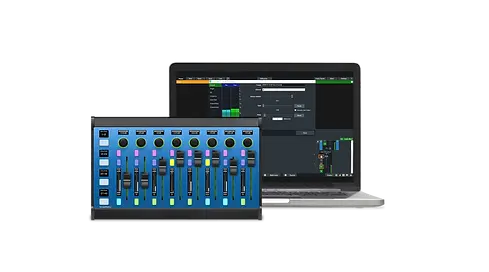
Take your audio production to new heights with SKAARHOJ’s fader-based controllers, designed for effortless integration with vMix Audio. From setup to operation, SKAARHOJ panels offer unmatched speed and reliability, providing instant, bidirectional control over your vMix audio channels. Whether you’re fine-tuning levels or making live adjustments, SKAARHOJ fader panels are built to ensure precision and efficiency. Wave Board, Wave Board Mini and Color Fly are all perfect additions to any vMix-based workflow. With SKAARHOJ panels, the vMix audio interface can remain minimized, leaving more screen space to other relevant sections as all essential functions are available and visible directly on the hardware panel.

Fader Panel Benefits
Fast and Easy Setup: SKAARHOJ audio panels are designed for close to plug-and-play integration with vMix, allowing you to get started in seconds without complex configurations.
Instantaneous Operation: Every action is reflected in real-time, ensuring no delay between hardware adjustments and on-screen changes in vMix.
Bidirectional Tactile Control: Motorized faders provide tactile feedback, automatically adjusting to reflect changes made within vMix or by the hardware controller.
Individual Channel Mapping: Assign all audio channels in vMix to dedicated fader strips, ensuring complete control over your mix.
OLED Displays with Live Audio Meters: Unique to SKAARHOJ’s Wave Board, Wave Board Mini, and Color Fly, the OLED screens display live audio levels, allowing you to monitor your mix directly on the hardware panel.
Supported Audio Parameters
SKAARHOJ fader panels provide full control over the following vMix audio parameters:
Gain: Adjust input sensitivity for precise volume control.
Level (Volume): Manage the output volume of individual channels or master audio.
Mute: Instantly toggle audio channels on or off.
Pan: Balance audio channels between left and right outputs.
Solo: Isolate and monitor a specific audio channel.
Bus Assignments: Route audio to multiple buses (e.g., A, B, C) for flexible sound management.
EQ Control: Adjust basic equalizer settings (if applicable in vMix).
Audio Effects: Toggle or adjust applied effects like compression or reverb (depending on vMix settings).


