
Raw Panel - Your Code, Our Panel
What is Raw Panel?
Raw Panel is SKAARHOJ’s FREE low-level API and protocol for talking directly to our hardware panels over IP. Your product connects straight to the panel via TCP, receives every button press, encoder turn, fader move and joystick change as triggers, and sends back colors, text and graphics for displays and LEDs. In practice, it turns any SKAARHOJ controller into a fully programmable “front panel” for your own software, hardware or control system.
Because Raw Panel is used internally across our own ecosystem, it is battle-tested in demanding broadcast and AV environments. The same protocol that powers SKAARHOJ-to-SKAARHOJ communication is what you get access to as an integrator or manufacturer.


Why Integrate Raw Panel?
Raw Panel is designed for developers, manufacturers and system integrators who want tight, responsive control surfaces without having to design hardware. You get access to the entire SKAARHOJ panel range – buttons, encoders, faders, T-bars, joysticks, OLEDs and LCDs – and can bind them directly to parameters in your own system. Typical use cases include:
-
Turning a SKAARHOJ panel into a dedicated controller for your mixer, router, camera system or media server.
-
Adding a high-end tactile surface to an existing software product without changing its core architecture.
-
Building custom control UIs for installations, where your logic runs on a server or controller and SKAARHOJ panels act as the human interface.
-
Turn other devices into Skaarhoj controlers with Raw Panel too, so if you want add Touch screens, Stream Deck, x-keys or USB Hid Devices, we got you covered too.
With a single integration to Raw Panel, you can support many different panel models and form factors, from compact controllers to large surfaces with multiple displays.
How Raw Panel Works
All communication in Raw Panel happens over TCP on an IP network. SKAARHOJ panels act as TCP servers, and your product connects as a client. Once connected, interactions are simple and event-based:
When a user presses a button, turns an encoder, moves a fader or joystick, the panel sends a trigger message identifying the hardware component and its value.
Your application responds by sending feedback messages that set LED colors, button states, text labels, or even graphical widgets on displays.
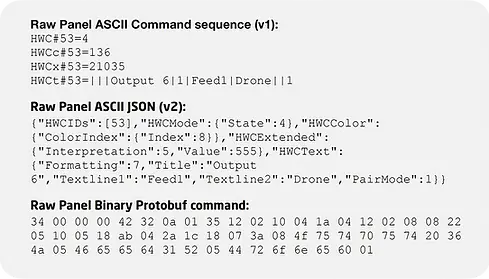
Messages can be encoded in several ways:
Human-readable ASCII (v1), ideal for quick testing and simple integrations.
JSON-based ASCII (v2), which is easier to parse and extend.
Binary Protocol Buffers, offering maximum efficiency and matching what we use internally in Blue Pill-based products.
You can start with simple ASCII commands in a Telnet-like session and later move to JSON or binary as your integration matures.
And a new cloud version of Raw Panel allows you to communicate with devices over the public internet breaking the barriers of local networks!

Self-describing Panels and Discovery
One of the powerful aspects of Raw Panel is that panels are self-describing. By issuing a simple command (like “list”) after connecting, the panel tells you exactly which hardware components it has: IDs, types, positions, display resolutions, color capabilities and more. This topology is described using a combination of JSON and SVG, allowing you to:
-
Automatically build configuration UIs for your product.
-
Render realistic panel visuals in your own tools and simulators.
-
Work with multiple panel models without hard-coding layouts.
Panels also advertise themselves on the network using mDNS/ZeroConf, which makes discovery straightforward on typical LANs.
Feedback, Graphics and UTF‑8 Text
Raw Panel is not just about reading button presses; it is designed for rich feedback. You can:
-
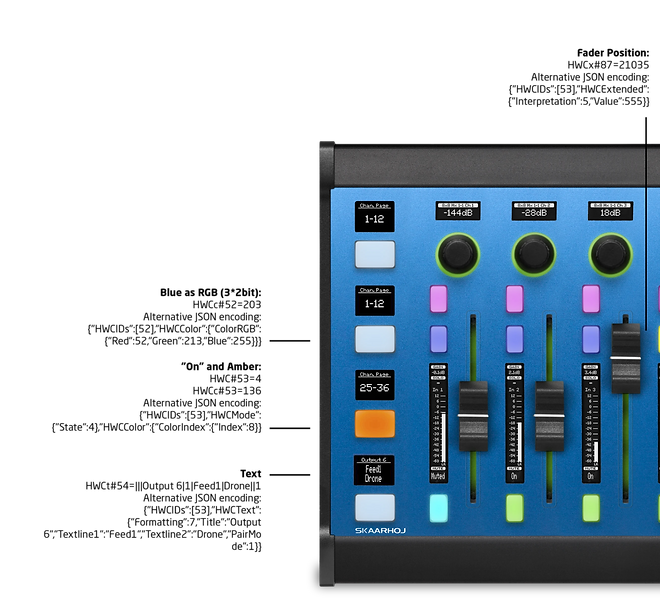
Set LED states and colors (by index or by RGB values) for each button.
-
Update titles and multiple text lines on displays, including UTF‑8 characters for international text.
-
Use “Processors” such as AudioMeter and UniText to generate graphical meters, bars and text layouts on displays from simple numeric or text input.
Processors handle scaling and rendering of visuals for you, so you send basic values and the panel produces clean meters, labels and widgets that look good at the native display resolution.
Emulator, Panel Explorer and Tools
To make development easy, Raw Panel comes with a free set of tools. - Download links available below.
-
Raw Panel Emulator: A cross-platform application (Windows, macOS, Linux) that emulates any SKAARHOJ panel. It hosts a TCP server like a real panel and shows a browser-based visualization of the surface, so you can test your integration without hardware on your desk.
-
Panel Explorer: A companion tool that scans your network for Raw Panel devices, connects to them, displays triggers in real time and lets you send feedback commands, including a “trigger scope” for analyzing timing and behavior.
-
Open-source reference code: Panel Explorer and other utilities are written in Go and released under the MIT license on GitHub, giving you clean example code and libraries to build on.
These tools shorten your “time to first success” dramatically, letting you see button events and feedback in minutes when testing your first integrations.
Beyond SKAARHOJ Panels: USB, Touch and Third-Party Devices
Raw Panel is also the glue that lets SKAARHOJ extend other control devices into the same ecosystem. Through dedicated applications, you can bring in:
-
Stream Deck and X‑keys devices as Raw Panel-compatible surfaces.
-
Generic USB HID devices like keypads and small controllers.
-
Touch-based UIs rendered in a browser using the xpanel-touch package.
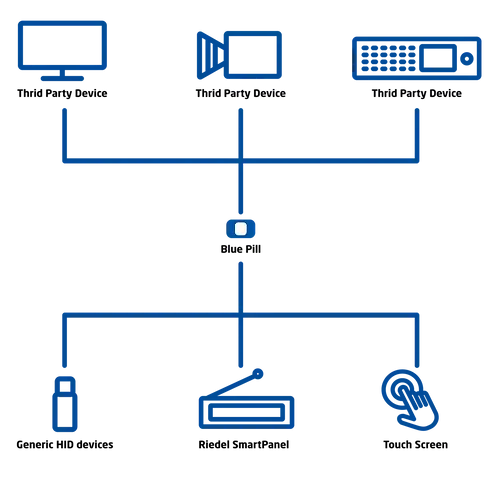
Inside the SKAARHOJ ecosystem, Raw Panel is also used to connect certain third-party products, like Riedel SmartPanels, and to generate Crestron modules (USP files) for integration into Crestron systems. From your product’s perspective, these devices all look like Raw Panel endpoints once they pass through a SKAARHOJ bridge.
Host-client Structures and SKAARHOJ-to-SKAARHOJ
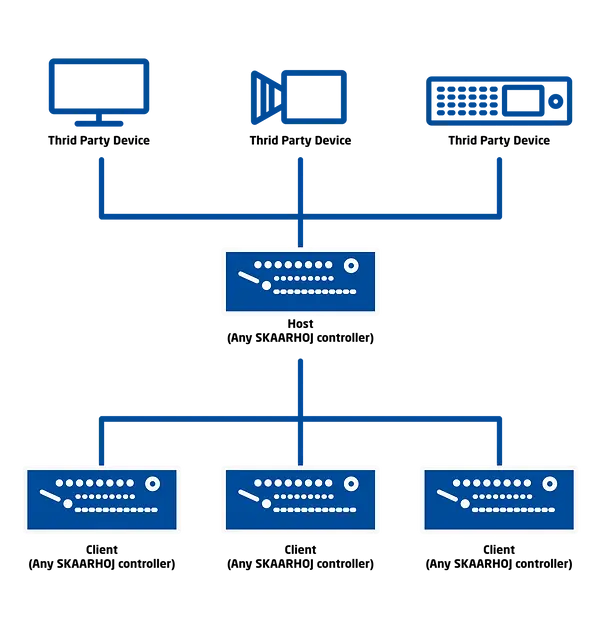
Within SKAARHOJ’s own ecosystem, Raw Panel is one of backbones that lets us build host-client controller structures. One “host” panel can control, mirror or coordinate multiple “client” panels, so that:
-
Large control surfaces can be built from smaller modules.
-
Operators in different locations can share views of the same system.
-
Specialized panels can focus on subsets of a larger system while still staying in sync.
-
The same set of 3rd party devices can be shared between multiple SKAARHOJ panels, reducing the need for duplicate setups.
-
A ‘funnel’ approach can be used where one panel connects to a 3rd party device and ‘distributes’ the connection across other SKAARHOJ panels thus reducing the number of active connections between a controller and the controlled device.
From a developer perspective, you can use these same patterns: one central application can talk Raw Panel to several SKAARHOJ panels at once and decide how they coordinate, mirror or divide responsibilities.
Useful Resources to Help You Succeed:
Raw Panel Device Core
In some use cases it’s possible to dedicate only a portion of a SKAARHOJ controller to Raw Panel. This is particularly useful for those wanting to incorporate custom control solutions into Reactor and thus combining the power of SKAARHOJ ecosystem with fully custom integrations. Or for users of Raw Panel-based integrations who want to also take advantage of existing SKAARHOJ integrations (device cores).
To take advantage of this, simply search ‘Raw Panel’ in the ‘devices’ section of Reactor.
Selected brands that integrated SKAARHOJ controllers using Raw Panel protocol:


![Vizrt-[Converted].png](https://static.wixstatic.com/media/9c7364_13f8e3b1157d4ac79ad7b2e9dbfabc0a~mv2.png/v1/fill/w_127,h_77,al_c,q_85,usm_0.66_1.00_0.01,enc_avif,quality_auto/Vizrt-%5BConverted%5D.png)




